
From reusing sandwich bags to moving back in with the parents, consumers can get quite creative when times are tight.
With food inflation up more than 8% for the year and gas close to $4 a gallon, some consumers are going to extreme measures to stay within their budgets.
Though some ideas might sound crazy -- car-engine fried eggs, anyone? -- others contain clever solutions to the everyday challenges of stretching a dollar. Here are eight of the best extreme-saving techniques, culled from some of the top minds on the Web:
Turn your car off -- while it's moving
Though AAA warns against this technique, some bloggers promote it as a way of saving gas. By using the car's momentum to glide into parking spaces or move downhill, you can get where you're trying to go with less fuel. Just make sure you practice driving without power steering and power brakes in an open space before experimenting near other cars -- or people. And never try this at high speeds; it's too dangerous.
Savings: You can shave a few dollars off your gas bill each month.
Reuse plastic sandwich bags
Sandwich bags can be easily rinsed out and dried, and used again the next day. As long as the bags don't touch raw meat, it's a hygienic and environmentally friendly way to save.
Savings: With a pack of 100 bags going for around $3, a family of four can save about $30 a year.
Stop saving money
All personal-finance experts harp on the need to create an emergency fund and funnel away money for retirement, but sometimes saving just isn't possible. In fact, it may make sense to forget about one or all of your savings accounts in order to meet your other responsibilities while avoiding credit card debt.
If you suddenly have an added expense, such as a new child (see "Raising your $290,000 baby"), then 401(k) contributions may need to go on hold.
Make your own cleaning supplies
Martha Stewart has long recommended vinegar and lemons as kitchen cleaners. To absorb unpleasant smells, leave vinegar in a shallow bowl on a kitchen counter. To deodorize a garbage disposal, squeeze lemon juice down it.
Savings: up to $10 a month on cleaning supplies.
Stop drinking soda (or another beverage of choice)
Tricia at Blogging Away Debt recently tried giving up soda as a way of cutting back on grocery costs. She estimates that if both she and her husband are successful in quitting fizzy drinks, they'll save about $50 a month. Going cold turkey with other drinks, from lattes to bottled water, can produce similar effects.
Savings: If you're used to two or three sodas a day, the change could save you $30 or more a month.
Move back home with your parents, at any age
When writer Nan Mooney became a single mom in her 30s, she moved in with her parents, who also provide some child care. The arrangement allows her to afford motherhood, she says. Other grown kids say they also enjoy the arrangement, even if it means giving up some privacy. Parents can benefit, too -- they get free pet sitters and help reducing their own costs.
Savings: up to $3,000 a month in avoided housing costs.
Get rid of your carpet
The blogger at Clever Dude points out that having and caring for a carpet requires regular shampooing and steaming, electricity to vacuum, and even medical costs from embedded allergens such as pet dander and molds.
Savings: around $200 a year.
Hold a no-spend month
That's what Rachel at the Small Notebook blog did. Her family of three made it a goal to live on $250 or less for the month. That included gas, entertainment, food and other everyday expenses. She says it helped make her more aware of the unnecessary items she had been buying.
Savings: as much as $1,000 a month, depending on your spending habits.
This story was reported and written by Kimberly Palmer for U.S. News & World Report.
CHECK OUT ALSO THESE USUEFUL LINKS
More from MSN Money and U.S. News
More extreme-savings tips
4 easy ways to be a 'freegan'
Why is it so easy to throw things away?
Smart money-saving ideas
Save money by giving up grooming and underwear
How to live the simple life
Monday, September 29, 2008
8 extreme ways to save some scratch


Friday, September 26, 2008
How to Sync Firefox Bookmarks with Foxmarks Bookmark Synchronizer
Foxmarks is an add-on for the Mozilla Firefox web browser. It lets you view and manage your browser bookmarks through multiple computers and access them online from any remote computer. Foxmarks is recommended by Firefox and is easy to install and configure.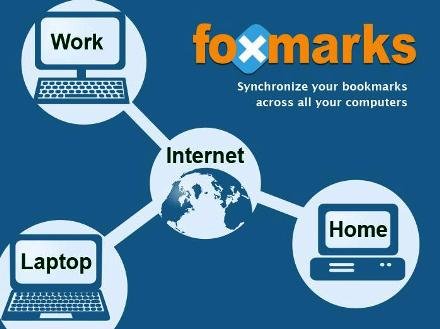
If you use Firefox on more than one computer, you’ll want Foxmarks. Install Foxmarks on each computer, and it will work silently in the background to keep your bookmarks synchronized. You can also log in to Foxmarks site to manage your bookmarks from any computer.
Download Foxmarks Bookmark Synchronizer
and follow the easy installation process in firefox!!
When you install this extension, it automatically starts the wizard and asks you to create a new account or login to an existing account. If you already have an account and want to use your bookmarks on a new machine, then just login to your account and it’ll synchronize all your bookmarks.
If you are using Foxmarks for first time, then create a new account and it’ll synchronize your bookmarks and will store them on its server so that you can use them on other machines.
You can also set Foxmarks to store your bookmarks on your own ftp site.
Its totally safe extension and works like a charm. You don’t need to worry about firefox crash, loosing bookmarks, etc.
Thursday, September 25, 2008
Turn Your Ubuntu 8.04 to Look Just Like Mac OSX Leopard
You can’t really turn a Linux system to a Mac, but you definitely can make your Ubuntu Hardy looks like a Mac OSX Leopard.
Before we start…
First, create a folder in your Home and name it Mac_files. Download the following files to the Mac_files folder.
* Modified Mac4Lin theme
* Mac4Lin icon set
* Mac4Lin wallpaper
* Avant Windows Manager elegant glass theme
Using Archive manager, extract the three Mac4Lin zip files Modified Mac4Lin theme and Mac4Lin wallpaper to the Mac_files folder.
Apply Mac OSX Leopard Theme
Go to System->Preferences->Appearance.
Select Install and select the Mac4Lin GTK theme (/home/username/Mac_files/Mac4Lin_v0.4/GTK Metacity Theme/Mac4Lin_GTK_v0.4.tar.gz).
Next, click Install again and select the Mac4Lin icon theme. (/home/username/Mac_files/Mac4Lin_Icons_Part2_v0.4.tar.gz /home/username/Mac_files/Mac4Lin_Icons_modified.tar.gz). When prompted, select “Apply new themes“.
Click Install again and select the Mac4Lin mouse cursor theme. (/home/username/Mac_files/Mac4Lin_v0.4/GTK Cursor Theme/Mac4Lin_Cursors_v0.4.tar.gz). Select “Apply new themes” when prompted.
Click ‘customize’ and choose Mac4Lin_GTK_v0.4. Go to the “Window border” tab, choose Mac4Lin_GTK_v0.4. Click Close.
On the top, go to the Background tab. Click Add and select the Leopard wallpaper. (/home/username/Mac_files/Wallpapers/Leopard.jpg). Click Close to terminate the Appearance window
Install the Dock (Avant Window Navigator)
Open a terminal (Applications->Accessories->Terminal) and type
gksu gedit /etc/apt/sources.list
and add the following lines to the end of the file:
deb http://ppa.launchpad.net/awn-testing/ubuntu hardy main
deb-src http://ppa.launchpad.net/awn-testing/ubuntu hardy main
Save and close the file. In your terminal, type
sudo apt-get update
sudo apt-get install avant-window-navigator-trunk awn-manager-trunk awn-extras-applets-trunk
Go to System->Preferences->AWN manager. On the left, click on the Theme. On the right, click Add and navigate to the Mac_files folder. Select the Elegant_glass.tgz file. Check the bullet beside the Elegant glass theme and click Apply.
Next on the left, click on the Applet icon. On the right, scroll down to the stack Applet. Highlight it, then click Activate. This will add the Mac Leopard stack to your dock.
Before you launch the AWN, remove the bottom panel from the desktop first. Right click on the bottom panel and select “delete this panel”. Open AWN via Applications->Accessories->Avant Window Navigator. Once it is activated, you can simply drag and drop the applications into the dock.
Install OSX Fonts
Open a terminal and type the following:
sudo apt-get install msttcorefonts
This will Install the Microsoft core fonts.
Next, copy the OSX fonts to the fonts folder
cd /usr/share/fonts
sudo tar xvzf /home/username/Mac_files/Mac4Lin_v0.4/Fonts/OSX_Fonts.tar.gz
Configure the fonts:
cd/
sudo tar xvjpf /home/username/Mac_files/Mac4Lin_v0.4/Fonts/fontconfig.tbz -C /etc/fonts
Open the Appearance window (System->Preferences->Appearance) and select Fonts tab. Select the following fonts according to the image below. Click Close.
Change the traffic light window control to the left
In the terminal, type
gconf-editor
This will bring up the gconf-editor window. Scroll down to App->Metacity->general. On the right, double click on the button_layout and change the content to ‘close,minimize,maximize:menu’ (without the quote). Click Ok and close the gconf-editor.
Change the menubar
Remove all the icon and applications on the left side of the top panel. Right-click on the icon and select ‘Remove from panel‘. You will left with something like this:
On the right of the top panel, remove the logout icon. Still on the right hand side of the top panel, right click and select ‘Add to panel‘. Scroll down the list and add ‘Search for files‘. This will add the spotlight icon to the panel.
On the extreme left, right-click and select ‘Add to panel‘. Scroll down the list and add ‘Main Menu‘. This will add the apple icon on the left. You can now log out and shut down from the Apple dropdown menu (same as Mac OSX).
Next, we are going to install globalmenu so as to display the menubar for each application. In your terminal,
cd Mac_files
wget http://gnome2-globalmenu.googlecode.com/files/gnome-globalmenu-0.4-svn964.tar.gz
tar zxvf gnome-globalmenu-0.4-svn964.tar.gz
cd globalmenu
sudo dpkg -i *.deb
If you have any errors when installing the package, try
sudo dpkg -i –force-overwrite *.deb
If you are having some installation problems with the gnome-globalmenu-applet, try
sudo apt-get install -f
Once finished, right click on the top panel and select ‘Add to panel‘. Scroll down the list and add ‘Global Menu Applet‘.
You might not see anything initially. Log out and log in again, you should now see the menubar for each application showing on the panel.
If your globalmenu is of a different shade of grey from the rest of the panel (as shown in the image below), right click on any empty space on the panel and select ‘Properties‘. Go to Background tab and select ‘Background image’. Under the selection, go to /home/username/.themes/Mac4Lin_GTK_v0.4/gtk-2.0/Panel and select panel-bg.png. Click OK. (Updated: If you can’t find the .themes folder, right-click and select ‘show hidden files‘.)
Drag the globalmenu to the left just beside the Apple icon. Right click on the globalmenu and select ‘Preferences’. Tick the box beside ‘Display the title of the current application‘ and put maximum width 100. Select the font to be Lucida Grande Bold. Click Apply and OK. You should now have a desktop that resemble Mac Leopard.
menubar-with-globalmenu
Configuring the Login screen
Click on the Apple icon, go to System->Administration->Login Window. On the Local tab, click Add. Navigate to the path /filesystem/home/username/Mac_files/Mac4Lin_v0.4/GDM Theme and select the file Mac4Lin_GDM_v0.4.tar.gz. Check the box beside the newly installed theme to activate it.
Underneath, there is a color selection field, select it and key in the number E5E5E5 into the color code field.
Click Ok. Log out. You should see the new login screen
Configure usplash screen
usplash is the screen that you see when your computer is booting up. We are going to change it to show the white apple screen. In your terminal,
sudo apt-get install startupmanager
Go to System->Administration->Start-Up Manager Go to Appearance tab. Click on the ‘Manage bootloader theme‘. Click Add and navigate to the file /filesystem/home/username/Mac_files/Mac4Lin_v0.4/GRUB Splash/appleblack.xpm.gz. Check the box “Use background image for bootloader menu” and select ‘appleblack”.
Next, click “Manage usplash theme”. Click Add and add the file /filesystem/home/username/Mac_files/Mac4Lin_v0.4/USplash Theme/osx-splash.so. Click OK. Select OSX-splash from the dropdown box.
Now reboot.
Creating Dashboard effect
We will use a combination of screenlets and Compiz widget plugin to achieve the dashboard effect.
Install Screenlets
sudo apt-get install screenlets compizconfig-settings-manager
Go to System->Preferences->Advanced Desktop Effect Setting. On the Left, click on Desktop. On the right, put a check beside ‘Widget layer’
Go to Accessories->Screenlets. Activate the widgets that you want to display. Right click on the widget and select ‘Properties’. Go to Options tab and select ‘Treat as widget’. Do this for all the widgets that you have activated.
You can now see your dashboard in action by pressing F9.
Done. You have completed the transformation of your Ubuntu desktop to Mac OSX Leopard.
Tuesday, September 16, 2008
15 Must-Have Firefox Downloads
Improve your experience with Firefox using these terrific add-ons that make many routine tasks easier and increase the browser's power many times over.
READ MORE HERE
Monday, September 15, 2008
five foods that can be good for your skin and body
Feed your face! Eat and then slather it on
Certain foods have powerhouse ingredients that keep skin supple and smooth and help fight age-related damage. Wondering what to eat and what to smooth on? Health magazine found five skin-saving foods to help both ways. (Be sure to do a skin-patch test first, and wait 24 hours to see if you have an allergic reaction.)
Strawberries smoothie mask
Strawberries have more anti-aging vitamin C per serving than oranges or grapefruit. Research shows that people who eat foods rich in vitamin C have fewer wrinkles (vitamin C helps fight free radicals, which break down collagen, leading to those dreaded lines) and less age-related dry skin. Apply a mask once or twice a week, and eat C-rich foods daily.
Recipe:
1 cup of frozen or fresh strawberries (you can also substitute in raspberries and/or blueberries — they’re loaded with antioxidants)
1 cup of vanilla or plain yogurt
1 1/2 tablespoons of honey (a great moisturizer)
Enjoy your smoothie, then apply the remaining smoothie to your face over a sink (it’s a little drippy at first), and leave it on for about 8 minutes before rinsing.
Easy green tea eye treatment
Curling up to a cup of green tea does a lot more than relax you. Green tea is filled with inflammation-fighting antioxidants. What’s more, research shows that drinking green tea may reduce your risk of skin cancer. (And when you add a generous squeeze of citrus juice-like lemon, lime, or orange — the tea’s antioxidants get a boost of staying power).
Recipe:
Chill any leftover damp tea bags in the fridge for an hour and then put them on your eyes for 10-15 minutes.
Sip at least three big mugs of green tea every day for an antioxidant boost. Green tea contains tannins, which can help reduce puffiness when applied to skin.
Pumpkin pudding facial
Pumpkin’s orange hue is from carotenoids, wrinkle-fighting plant pigments that help neutralize free radicals in the skin. Pumpkin is filled with vitamins C, E, and A, as well as powerful enzymes that help to cleanse the skin. Although the seeds make a great fiber-filled snack, you get the skin-saving antioxidants from the pulp. Eat and apply the facial once a week.
Recipe:
In a food processor or blender combine:
2 cups canned pumpkin
4 tablespoons low-fat vanilla yogurt
4 tablespoons honey
1 teaspoon pumpkin pie spice
Coat face; leave on for 10 minutes, then rinse.
(To make a sweeter pudding add: 2 tablespoons 1/3 less fat cream cheese and ½ teaspoon vanilla extract.)
READ MORE HERE
Friday, August 8, 2008
Sunday, July 27, 2008
System icons may not appear in the notification area on a Windows Vista-based computer
System icons may not appear in the notification area on a Windows Vista-based computer until you restart the computer
SYMPTOMS
When you first start a computer that is running Windows Vista, one or more of the Network, Volume, and Power icons may not appear in the notification area at the bottom of the screen. You may also notice that the check boxes for the related system icons are not selected on the Notification Area tab of the Taskbar and Start Menu Properties dialog box. However, the network, volume, and power features function correctly even though their associated icons do not appear in the notification area. You can access these features by using Control Panel.
CAUSE
When the system or an application wants to put an icon in the notification area, the system or the application sends a discrete communication message to the operating system "shell." If the operating system is very busy, that message may expire, or may time out. When this time-out occurs, the icon does not appear in the notification area. This issue typically occurs during the first system startup. During the first startup, the system is very busy processing many startup, application, and service initializations.
Note These startup service initializations may take from one to six hours to finish, depending on which applications are preloaded on the computer. For example, the initialization time varies depending on the number of startup applications or services that a customer has ordered or that the computer manufacturer has added to the computer.
WORKAROUND
When you first start a new computer, the operating system typically runs a "customer welcome" sequence. This sequence is also known as the "out-of-the-box experience" (OOBE). The operating system runs the sequence and also starts other applications and services for the first time. Give the operating system enough time to finish these startup service initializations before you shut down or you restart the computer. This issue will typically not reoccur after the operating system has finished initializing all the background services, becomes less busy, and then has been restarted.
Note You can determine whether these service initializations are finished by observing the hard disk drive light activity (if your computer has this feature). If the hard disk drive light blinks intermittently instead of being solidly lit, these service initializations might be finished. You can also check CPU usage on the Performance tab in Windows Task Manager. If CPU usage is less than 15 percent, the service initializations might be completed, and you can shut down or restart the computer.
How to make the icons reappear
Warning Serious problems might occur if you modify the registry incorrectly by using Registry Editor or by using another method. These problems might require that you reinstall the operating system. Microsoft cannot guarantee that these problems can be solved. Modify the registry at your own risk.
If you have tried the restart workaround that is listed earlier in this article for this issue and one or more of the system icons still do not appear in the notification area after the restart, you can try the following registry modification workaround.
Note You may have to reapply this workaround after you restart the computer if the icons still do not appear in the notification area.
You can make the icons reappear by deleting two subkeys from the registry. To do this, follow these steps:
1. Click Start Start button, type regedit in the Start Search box, and then press ENTER.
User Access Control permission If you are prompted for an administrator password or for a confirmation, type the password, or click Allow.
2. Locate and then click the following registry subkey:
HKEY_CURRENT_USER\Software\Classes\Local Settings\Software\Microsoft\Windows\CurrentVersion\TrayNotify
3. In the Details pane, click the IconStreams registry entry.
4. On the Edit menu, click Delete, and then click Yes.
5. In the Details pane, click the PastIconsStream registry entry.
6. On the Edit menu, click Delete, and then click Yes.
7. Exit Registry Editor.
8. Restart the Explorer.exe process. To do these, follow these steps:
a. Press CTRL+SHIFT+ESC.
b. On the Processes tab in Windows Task Manager, click the explorer.exe process, and then click End Process two times.
c. On the File menu, click New Tasks (Run), type explorer, and then click OK.
d. Exit Windows Task Manager.
Tuesday, July 22, 2008
Monday, July 14, 2008
7 Cool Careers You've Never Heard Of
The downhill direction of the economy has us all thinking about ways we can protect our livelihood. Why not start by getting creative? Consider some little-known career paths that will ensure that you stay competitive and look forward to going to work every morning. Here are seven cool jobs to consider today:
Computational linguist
Computational linguists teach computer systems how to process natural language. For example, if you're trying to order a book from Amazon in Japanese, the site will be able to recommend other relevant similar titles for you. Enter the field with a bachelor's degree in computer science and start with a salary in the high five figures.
How to break in: Meet valuable contacts by getting involved with the Linguistics Society of America (http://www.lsadc.org/) and the Association of Computational Linguistics (http://www.aclweb.org/).
Conservationist
Conservationists work with the government, industry associations and landowners to come up with methods for combating damage and for using land without injuring the environment. They generally hold a bachelor's degree in fields such as ecology, agriculture, biology or environmental science.
How to check it out: Gain real-world experience. Volunteer or intern at a government agency or environmental or community organization.
Doula
Birth doulas advise on birthing techniques and serve as the mother's advocate during labor. Postpartum doulas assist with emotional and physical recovery from childbirth and teach coping skills to new parents. You don't need a college degree to become a doula, but to be competitive in the field you should be certified by Doulas of North America (http://www.dona.org/). The median fee for a birth doula is $700 per birth.
How to get a jump-start: Get to know established midwives and doulas in your area and ask if you can witness a birth or postpartum counseling session to see if the field's for you.
Futurist
Using data from the past and present, futurists study how the present will evolve into possible alternative futures and how humans will adapt to the resulting technological, demographic, political, environmental and sociological changes. The majority of jobs require an undergraduate degree in a liberal arts or business discipline, and consulting futurists for companies and governments often command a six-figure salary within a few years.
How to penetrate the field: Check out the World Future Society's (http://www.wfs.org/) directory of consulting futurists and do informational interviews with firms located in your area.
Image consultant
Image consultants advise people with discretionary income how to make positive impressions -- through appearance, wardrobe, etiquette and communication skills -- in order to get ahead in their careers and social lives, and boost their self-confidence. You don't need a college degree, but organizations such as the Training Institute School for Image Consultants (http://www.newyorkimageconsultant.com/) in New York City offer course work in color analysis, wardrobe and style analysis, and personal shopping.
Want to make this your dream job? Join the Association of Image Consultants International (http://www.aici.org/) and see if you can work as an apprentice to someone who has already established herself in the field.
Life coach
Coaches love talking to people, figuring out what makes them tick and developing plans to help them succeed in their personal and professional lives. They meet with clients in person or over the phone on a regular basis and listen to challenges, set goals and monitor progress. While anyone can call himself a life coach regardless of education, it's best to be certified by the International Coaching Federation (www.coachfederation.com/ICF).
How to get moving: Hire your own life coach so that you can gain an in-depth understanding of the coach-client relationship.
Professional organizer
Organizers provide personal assistance, planning and products to help people de-clutter their homes and offices. While the National Association of Professional Organizers (http://www.napo.net/) does offer a certification program involving a mix of paid work hours and course work, most organizers agree that formal education isn't necessary. The average organizer is paid $50 per hour, with individual projects taking a full day or even several days.
How to get your foot in the door: Offer to help your disorganized friends and family members for free so that you can create some initial written success stories and be able to showcase "before and after" photos on your marketing materials.
Read more HERE!!