Monday, March 25, 2013

5 Smart Home Technologies That Will Save You Money

smarthome 5 Smart Home Technologies That Will Save You Money

Swapping out old home appliances and replacing them with new “smart” technologies and systems can be a good move by opening up the door to saving a substantial amount of money on utilities. Each household will be different and will require a unique look into the needs and uses of these potential technologies. Not every solution listed here will benefit every household equally. For example, small homes which don’t use very much electricity might not benefit from installing solar panels like a large home. The future looks bright for energy conservation and smart gadgets are entering the market for consumers at an ever increasing rate.

1 – Renewables

solar panels1 5 Smart Home Technologies That Will Save You Money

Solar energy. Solar panels convert the energy from the sun into electricity which is used in the home. Homes located in geographical areas with more sunlight will benefit more from these energy solutions. The direction of the roof also plays an important role in using energy from the sun. You’ll also want to consider the size of your home, how much energy you want to replace with renewables, and manufacture/government rebates and tax incentives for using solar panels.

In general, if your home uses lots of electricity you will begin to save money with solar energy very quickly. Many solar companies also now provide a power purchase agreement (PPA) in which you essentially lease the solar equipment from them and agree to pay for the energy your system produces. The energy is a fixed rate, the installation and maintenance costs the homeowner almost nothing, and the rates are much lower than traditional utilities. By combining solar renewable energy and home automation systems this becomes a smart alternative to getting electricity from the power company.

In general, by going with the solar panel solution, you can count on saving about 30% off your energy bill. If you decide to purchase the solar panels out right, plan on spending $2000-$10,000 depending on the size of your home.

wind turbines17 5 Smart Home Technologies That Will Save You Money

Wind energy. Purchasing and using home wind turbines to create electricity is another possibility in the quest to save money. The most effective wind turbines are not small. Many of them reach heights up to 20 or 30 feet in the air to produce the needed energy from the wind. If a tall wind turbine is going to be a problem as an eyesore this might not be a good solution. The good news is that even though they are tall there is not a problem with wind noise so they won’t be disturbing yourself or the neighbors by the noise they create.

Take a look at The Windspire, priced around $5,000 and with a annual energy production of 2000 kWh, to get an idea of whats out there. For a less pricey version of harnessing wind energy, look at Air Breeze, a small traditional looking wind prop capable of producing 200 watts daily. That’s about the amount of power to run a computer or TV. Priced at around $500 it might take you a while to make up the difference in energy saving. The wind generated renewable energy market doesn’t have roots as deep as solar yet, but the market is emerging and worth keeping your eye on. According to the US Energy Information Administration the average residential energy use is 11,496 kWh. If you had half a dozen Windspires in your yard you might be able to go completely powered by wind, but that’s probably not realistic or economical.

2 – Smart thermostats

The Nest Smart Thermostat in Kitchen 5 Smart Home Technologies That Will Save You Money

Investing a few hundred dollars on a thermostat which can teach itself the best way to manage temperature control in the home is a very worthy investment. There is a thermostat on the market which is getting a lot of recognition for its functionality and smart benefits to users, it is called Nest. This little device will run your home temperature settings all by itself and can help save money on energy bills. It learns when you wake up and will adjust the temperature to a comfortable setting before your feet hit the floor in the morning.

It will also learn when you go to work, come home from work, and can even sense your presence in the home and will adjust the temperature accordingly. Nest has built-in motion detectors to adjust temperatures to the perfect setting regardless if you are home or away. If you’re not satisfied with how the thermostat is being automated you can control it with your smartphone from anywhere. All these little adjustments will definitely save you money. 50% of the average homeowner’s electric bill goes to heating and cooling. Nest will also adjust itself automatically depending on the weather because it plugs into your Wi-Fi and checks forecasts.

According to the manufacturer, households could cut 30% off their average energy bill simply by plugging this little device in. So in essence, you get a thermostat which learns how to ultimately control your environment without your input, can save you up to 30% on your heating/cooling costs, and only cost about 10% more than a standard hi-tech thermostat on the market today.

3 – Light occupancy sensors

Occupansy sensor 5 Smart Home Technologies That Will Save You Money

Installing light occupancy sensors to turn off or on the lights has the potential to save money. As any parent knows, no matter how many times you remind your children to turn off lights they never seem to remember. The general estimation of how much money is wasted every year on lights which get left on ranges in hundreds of dollars. If a 100 W lightbulb is left on for 10 hours it uses 1000 W of electricity, or 1 kWh. A quick look at your electric bill will reveal how much you spend per kilowatt hour.

If the average is $.20, then that 100 W lightbulb left on for 10 hours would cost you…$.20. Then multiply this number by the amount of lights you leave on throughout the day and you will start to get an idea about how much energy you waste. Again, probably hundreds of dollars per year. A solution to that wasted energy is motion activated lighting sensors. A really easy way to implement this is by simply purchasing a motion sensor plug which fits in the old outlet.

Then plug the light into the new sensor, attach multiple lights to it, and you’re done. Highly trafficked rooms will probably not benefit much from this technology, but low to medium trafficked rooms, which often have lights forgotten in the on position will be the best bet. Simple motion sensors like this cost anywhere from $10-$20. There is another solution to controlling forgotten lights. Home automation systems can connect all lights to a computer program on your phone. You can simply monitor which lights are on and turn them off as needed.

4 – Smart grid ready appliances

LG Smart Appliances Just One Tap of the Smartphone Away 5 Smart Home Technologies That Will Save You Money

There is a strong sense in both private enterprise and government circles that the smart grid will be slowly implemented across much of the nation and the world over the next decade. The smart grid uses information to communicate the personal habits of electricity consumers back to the energy companies. In essence if your household uses lots of electricity during peak times you’ll be charged a higher rate. In response appliances are being rolled out which have the capability of communicating with the smart grid.

Not only will you be able to communicate with your refrigerator via your phone, your refrigerator, dishwasher, oven, and washing machine/dryer will all be able to communicate with the smart grid. Your appliances will automatically know optimal times to perform their functions. These times will be at the off-peak hours allowing you to save money by not incurring the higher rate. Manufacturers of such appliances have already introduced energy-saving features into their products which help mitigate energy costs, but these new smart appliances will take this a step further by knowing when to operate without you even worrying about those peak rate issues.

According to the Department of Energy the tax incentives and credits, plus the ability to lower energy costs, will help make these appliances purchase worthy just a few years into the purchase. The good news is that these smart grid ready appliances are finally on the market, and are not that much more highly priced than normal high-end appliances.

5 – Water wasting

water pebble 5 Smart Home Technologies That Will Save You Money

We all know that wasting water by taking extra long showers is bad for our utility bills and bad for the environment. There is also lots of wasted electricity heating up all that water for those showers, and don’t forget about wasted energy from old water heaters and non-insulated pipes. Because of this there might be a tendency for homeowners to consider upgrading their old-school water heater to a new tankless water heater in an attempt to save money on utility bills.

That is not a bad idea, but there might be some more practical solutions you can try first, because a tankless water heater is not inexpensive. Before you decide to go tankless you should contact an expert to look at your specific needs. The reality of the situation is that it really depends on the home, water use, and price for gas in the area. Even if water heaters are upgraded it is still possible to waste money by excess water usage if you don’t change bad showering habits. Sometimes the simplest devices can truly benefit us by simply reminding us to turn the water off. For only $10 you can purchase a simple product on the market called Water Pebble. It’s a small device you place at your feet in the shower. As you start the shower you’ll see a green flashing light. As you continue the light will go from green to yellow, and finally blink red indicating that your shower time is over.

Make no mistake about it, this device is smart. It tracks the amount of time you spend in the shower during the first use, and each consecutive use it shortens that time by seven seconds. When it becomes too short you simply hit the reset button. According to the manufacturer this device could end up saving you more than $300 per year on wasted water and energy. This might save you more than 12,000 gallons of water per year. Not a bad solution to save money with a simple $10 device.

courtesy of freshome 

Friday, March 8, 2013

10 Ways to Utilize Your Smartphone to Control Your Home


SmartHomeART 10 Ways to Utilize Your Smartphone to Control Your Home

Your smartphone is only as good as the apps you have, right? Of course I know there are other components to a quality smartphone than just applications. Things like cameras, Internet connectivity,file storage, or whatever you want to use it for, but when you get ahold of the right applications you can do more then you think. In fact, with the right tools your smartphone might even pay for itself.

Let’s explore some ways we can use our devices to manage our homes. You see, we live in an age where home appliances are becoming “smarter” everyday. That means they have more powerful computer chips installed within their plastic/stainless steal bodies and they can talk to each other and to your smartphone via Wi-Fi connectivity. Here are 10 ways you can utilize your smartphone to control your home.

1 – Smart thermostats

The cool little device called, Nest, is getting a lot of buzz lately. Remember the iPod? Yeah well, the guys who designed the iPod created a really neat thermostat. This thermostat has Wi-Fi, and it comes with an iPhone application. That means you can control the temperature of your home from anywhere! Do you want to save money by turning the temperature down while you’re gone, but you don’t want to come home to a freezing house? No problem. Use your smartphone to turn up the temperature before you get home.

Once you start using Nest it will learn your schedule and program itself to optimally save lots of money on utilities. That means it won’t be long before, Nest, is already changing the temperature automatically for you when you leave, and turning it back up when you get home.

2 – Motion activated security cameras

home cameras 10 Ways to Utilize Your Smartphone to Control Your Home

Having a motion surveillance system  for your home is almost better than cable TV. There are nifty applications on the market coupled with compact, yet high-quality security cameras which allow you to be aware of anyone in your home. These cameras don’t record everything, they simply wait for motion to be detected and then switch on. It can alert you on your phone that it’s turning on and you can be anywhere in the world and still watch live footage from your home. Talk about a vacationers dream! You can also adjust the security settings with your smartphone, and if you couple that with some other home automation systems, you can control almost everything from your phone!

3 – Security system

HomeSecurity 10 Ways to Utilize Your Smartphone to Control Your Home

Remember that home security system you had installed a few years ago with the control panel strategically placed by the garage door or master bedroom? Now with the availability of mobile computing, you can ditch the old control panel and program everything through your smartphone. You will also be able to receive instant notifications of any foul play.

If you have the newest smart key technology on the market called Lockitron, you’ll be able to lock, un-lock, and send time sensitive smart keys to your family and friends if they need to get in your house. Not only does this make life more hassle-free, but it also takes the worry out of giving your neighbor the key to your house while you’re on vacation, so he can feed your dog. All you do is give him a digital key that only works during the time you designate for it and your house locks up once the time expires.

4 – Pet feeder

Pet Feeder 10 Ways to Utilize Your Smartphone to Control Your Home

If you’re like me, you love your pet, but you’re super busy and it’s not always convenient to be home at scheduled feeding times. There are several applications on the market you can download that allow a visual confirmation with a camera and a remote food dispenser.Pintofeed is one of a few new feeders using this cool new technology. We can all thank them for taking some hassle out of owning a pet. Now if someone would just invent an automated pooper-scooper…

5 – New improved lighting

Bedroom lighting 10 Ways to Utilize Your Smartphone to Control Your Home

Phillips makes a smart light bulb called Hue, which allows you to easily control all the light bulbs in your house. This makes a lot of sense if you don’t want to completely retrofit to new lamps or light switches. Simply by these smart bulbs and you can change the color of the lights, how bright or dim you want them to be, and of course turn them on and off… so much for the clap-on and clap-off lights.

6 – Coffeemakers

Coffee Maker 10 Ways to Utilize Your Smartphone to Control Your Home

Sure, some coffeemakers on the market are already fully programmable, but how many are connected to your smartphone? Can they course correct if you want to make a change? If you wake up in the morning and you don’t feel like the normal cup of java, and you want to get your day started with an espresso, instead of trekking across the entire house just to make the switch before the coffee pot turns on, just do it from your smartphone. Scanomat is leading the way in this amazingly useful trend.

7 – Smart keys

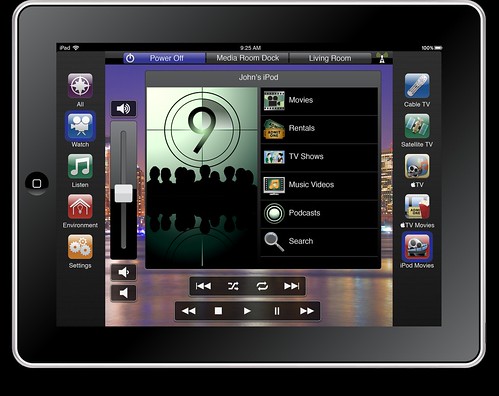
Tablet Home control 10 Ways to Utilize Your Smartphone to Control Your Home

Using traditional lock and key deadbolts to open doors is so 2012. Upgrading your lock and key system means a lot of security like never worrying about somebody making a carbon copy of your key to enter your home when you’re not around is taken care of. It also means that you can see which doors are unlocked or open at any time. You can also make temporary keys for people who need to get inside on a short term basis. But for me, and most importantly, this means you don’t have to carry clunky keys around in your pocket anymore to open your home. As I mentioned above, Lockitron is leading the way in this exciting technology.

8 – Electrical outlet upgrades

If you’re not looking to go around buying a dozen new appliances that have Wi-Fi capability that talk to your smartphone just so you can turn on your coffee pot, you can retrofit old outlets with smart outlets that are app friendly. Simply plug in your appliances into these new outlets and you can control them with your phone. Best of all, they’re very cheap compared to buying all new appliances!

9 – Remotely start your vehicle

There are several applications on the market which connect your smartphone to your vehicle, allowing you to remotely start it and turn on your heater. This is especially beneficial when you live in climates which, well let’s just say, aren’t friendly for wearing shorts all year. Running outside in 10 degrees below to warm up the car is brutal and unnecessary. One company I found that has great reviews and an innovative product is Viper.

10 – Home automation

Home automation Kitchen TV 10 Ways to Utilize Your Smartphone to Control Your Home

It is true that you can DIY most of these applications? Yes, it certainly is, but the problem you will find is that when you piecemeal all of these processes you might come up short by not being able to cover absolutely everything in your home. In addition, you might have to download dozens of applications which talk to dozens of devices or appliances to make this all work. Talk about confusing.

Consider a third party solution to automate your home by retrofitting old appliances, lights, security systems, and even solar panels. If you live in North America, consider using Vivint. They’re considered by many 3rd party reviewers as the best “bang for you buck”. If you live in Europe, consider using Quby. I’ve read good things about them as well. If you just have a few small pet projects then DIY and test it out, but if you are thinking big and have a limited budget then automate with a professional.

www.freshome.com

Top 10 Benefits of Automating Your Home


home automation Top 10 Benefits of Automating Your Home

We live in a time unlike any other. With so many technological advancements at our fingertips, our lives are made easier, which is fortunate considering the fast-paced lives most of us lead. In recent years, great strides have been made in making homes a bit more “tech savvy.” This technology, in short, allows the homeowner to run his or her home while away through a remote, often on a Smartphone or iPad. In fact, these homes have been labeled as being “smart,” due to the fact that they can seemingly think on their own. This ability to “think,” also known as being an automated home, helps homeowners in a number of ways: 10, in fact. What are the ways in which a home automation system can benefit you?

Benefit #1 – Adds Safety Through Appliance and Lighting Control

home light automation iphone Top 10 Benefits of Automating Your Home

Another home automation advantage is added safety for both your family and home. You have the ability to control the small appliances and lighting, again with the simple tap of your finger on your favorite technological device. You can always check to make sure your daughter turned off her curling iron or ensure that your oven has been flipped off from the morning family breakfast. Your home and family also enjoy an added measure of safety through your ability to control the lights in your home. Not only does this allow you to make sure lights are off when you are gone to save electricity, it also allows you to turn them on at specific times if you would like it to look like you are home. This also helps increase the safety and security of your home.

Benefit #2 – Secures Home Through Automated Door Locks

automated door locks Top 10 Benefits of Automating Your Home

Perhaps one of the greatest benefits of an automated system in your home is automated door locks. How often have you left for work in the morning only to realize that you forgot to lock your front door? Through an automated system, you can lock your doors with the tap of your finger. This quickly eases your mind, so you can focus on your day’s work rather than who may or may not be entering your home. This is also a great benefit for you if you have to leave to work before your children leave for school. Often, children run out the door to catch the bus and forgot to lock the door. You can easily have control of the situation by locking the door from your office each day. The fact that you can be alerted each time someone enters your home also allows you to monitor who is entering your home at all times, even when you are not there.

Benefit #3. – Increases Awareness Through Security Cameras

iphone home security camera Top 10 Benefits of Automating Your Home

Unfortunately, we just cannot be everywhere at once. This means that we often miss things that happen, perhaps even in our own home or yard. With a home automation system, you can easily see what is happening. Now you can make sure no unwelcome guests arrive unbeknownst to you or your family. Security cameras increase family safety by recording clips when detecting movement or at specific times of the day or night.

Benefit #4 – Increases Convenience Through Temperature Adjustment

home temperature control automation Top 10 Benefits of Automating Your Home

Often, we leave for work early in the morning and forget to adjust our thermostat. As a result, we come home to a house that is severely too hot or too cold. This is inconvenient, as it usually takes a good amount of time for the household temperature to increase or decrease after being adjusted. However, with a home automation system, you can simply adjust the thermostat from the convenience of your office a few hours before heading home. This is both cost effective and saves on energy, and it helps you stay “on top of” your life when you have run out the door first thing in the morning without considering much else besides arriving to work on time.

Benefit #5 – Saves Time

2283676770 6b53f8b77f Top 10 Benefits of Automating Your Home

It is no secret that today’s world is busier than in days past. If you are like most people, you are constantly running from place to place, working to accomplish everything on your never-ending “to-do” list. Because of the high-tech nature of a home automation system, you never have to worry about running home to open the door for your children after school or making a quick stop at home in order to adjust household items. In short, you easily save precious time and experience more daily productivity.

Benefit #6 – Saves Money and Increases Convenience

As mentioned earlier, a home automation system saves money. The most beneficial impact the system will have is on your monthly utility bill. No longer will you be spending money for household appliances left on in your family’s absence. You will also save on gas costs, as you will never need to stop by the house in order to turn something off or on. This is certainly convenient. You will have complete control to make sure costs are low without exerting any additional effort

Benefit #7 – Contributes to Economy

3990492123 88cba94345 Top 10 Benefits of Automating Your Home

Simply put, you are contributing to the economy when you purchase and utilize a home automation system. You ensure that you are only using the energy and resources that are necessary while you are home.

Benefit #8 – Increases Peace of Mind

Perhaps this benefit will not apply to everyone, but for those who habitually worry about whether or not they have taken care of everything at home before leaving for the day, a home automation system is a perfect investment. In short, it offers peace of mind. This is quite beneficial for those individuals who leave each day, obsessively worrying if everything is in order. With so many stresses in daily life, it is nice to take at least one off the list by being able to see what is going on at home without physically being there.

Benefit #9 – Allows You Control When Out of Town

5963656323 433dfe8fc3 Top 10 Benefits of Automating Your Home

Have you ever gone out of town and given a key to a neighbor? Many do this in order to allow the neighbor to perform household chores that cannot be neglected such as feeding the plant, taking care of the dog, or delivering the mail. A home automation system allows you just a bit more control than simply turning over a key, which is a great relief to some homeowners. You can easily set up a time for the person to enter your home and let him or her in yourself through your smartphone or iPad.

This allows you to stay in control of the situation. You no longer need to worry about the neighbor losing that key or having complete, unrestrained access to your belongings. In addition, you can make sure the chores are actually being completed, so you do not have any surprises when you return home.

Benefit #10 – Keeps Tabs On Your Children

digital wireless home monitoring Top 10 Benefits of Automating Your Home

Through the home automation system, you can easily keep tabs on your children. You can ensure that they make it safely into the house each night, letting them in without getting out of bed to greet them. You can also see their comings and goings on security cameras, as well as make sure the porch is lit when they arrive home.

This helps you keep them safe, as well as helps you know what they are up to each day, which can be quite helpful for a busy parent. In sum, investing in a home automation system will benefit you in several ways. It is cost effective. It will save you time and energy. And perhaps the most important? It will keep you and your family safe and your home secure.

www.freshome.com

Monday, March 4, 2013

STANDARD PROCEDURES FOR LAND AQUISITIONING IN GHANA

Below are four set standards to acquire land in Ghana:

1.       Land Inspection: The investor must check the boundary corners of the land in question to verify the full extent of the land and be sure of the feasibility of the project to be used. This must be done by an expert and must be in the presence of the land owners as witnesses.

2.       Land Search: This is the most important stage. Here Surveyors   go onto the land to pick and demarcate the land parcel. The result is taken to the lands commission of Ghana to verify the true ownership of the. If the name that comes up is the same as your land owners, then you can carry on the process, if not quit or seek a legal advise.

3.       Land Documentation: The investor can proceed with the documentations, normally after a quarter or part payment has been done. The land owners then prepare the documents which must include a true and certified copy of Indenture and site plans.

4.       Land Title Certification: Actually this can be done simultaneously with the projects inception since the land title certification from the Land title registry of Ghana takes quite some time, about four mouths.

VIEW

Sample Of a Site Plan

Sample Of a Site Plan

Source: Gyropod Survey Consult

Friday, November 30, 2012

How To Change / Edit Command Shortcut Keys in AutoCAD

1. Enable the ribbon tool by typing ‘ribbon’ in the command prompt

2. Navigate to the ‘manage’ Tap

3. Select the ‘edit aliases’ tap

4. A notepad should open up displaying all the shortcut keys in autoCAD. Edit them carefully.

5. Remember to run ‘reinit’ in the command prompt and select the ‘pgp’ button to make your changes active without restarting


OR


1. Select the ‘tools’ menu

2. Click ‘customize’

3. Select ‘edit program parameters (acad.pgp)’

4. A notepad should open up displaying all the shortcut keys in    autoCAD. Edit them carefully.

5. Remember to run ‘reinit’ in the command prompt and select the ‘pgp’ button to make your changes active without restarting

Sunday, October 14, 2012

Top 7 Health Benefits of Warm or Hot Water

Water is very important for survival. From doctors to dieticians, every expert advices to drink 7-8 glasses of water regularly. While some people prefer cold water, there are many dieters who drink hot or warm water. It is believed that hot or warm water is good for the body as it has many health benefits. Lets brief out the health benefits of drinking hot or warm water.


Health benefits of warm or hot water:

Benefits Of Drinking Hot Water Cleansing and purifying: One of the most important benefits of drinking hot water is, it is effective in cleansing the body. Poor digestion can be easily treated by having a glass of hot water twice a day. Drink a glass of hot water early in the morning. This will flush out toxins from the body and cleanse the system. You can mix hot water with honey or lemon for best results.


Cures constipation:
This is a common stomach problem that develops due to water scarcity in the body. The stool deposits in the intestines and reduces the bowel movement. This makes you suffer from constipation where passing out stool is difficult and sometimes extremely painful. Have a glass of hot water empty stomach in the morning to improve bowel movements and cure constipation. Hot or warm water breaks down food particles and passes them out through intestines.


Aids weight loss:
Many dieticians ask you to drink a glass of hot water with lemon and honey every day to lose weight. Well the advice is very helpful in shedding extra pounds. Hot water breaks down fat deposits from the body and helps in weight loss. Have a glass of hot or warm water with either lemon or honey or both, after every meal. Lemon has pectin fiber that controls food craving and is ideal for people who are on alkaline diet.


Good for cold and cough:
Irritation in the throat due to cough or tonsil can be really painful. One of the health benefits of drinking hot or warm water is, it reduces throat pain, liquifies thick cough and helps it come out easily.

Increases sweating:
When you drink a hot beverage, you sweat a lot for sometime. This is because when we drink hot water or any other beverage, the body temperature rises and the water tries to cool down the temperature through sweating. Sweating helps clean the skin cells by taking out excess water and salt from the cells and body.


Improves blood circulation:
When you drink hot water, the fat deposits in the body burns and the built up deposits in the nervous system also breaks down. This improves blood circulation in the body and also flushes out harmful toxins.


Reduces body pain: Drinking a glass of hot water with carom seeds is an effective home remedy to cure menstrual cramps. If you have stomach pain, headache or body pain, have a glass of hot water to get instant relief.


These are few health benefits of hot and warm water. Ideally, hot water is more effective but, many people prefer warm water on a regular basis.

4 Surprising Secrets About Bottled Water

Bottled-Water Secret #1: It doesn’t taste any better

In a 2010 study published in the Journal of Sensory Studies, researchers asked people to rate the taste of six bottled mineral waters and six types of tap water. They found that, overall, bottled water didn’t perform any better than the stuff from the tap. The reason: It’s mineral concentration, not "water purity," that influences flavor. The study’s participants preferred water with medium mineralization, which they described as “tasteless” and “cooler,” but whether it came from a bottle or the tap made little difference. What is clear: By filling your belly, drinking water before meals can help you lose a ton of weight. In fact, it's one of the 20 Habits Skinny People Live By.


Bottled-Water Secret #2: It’s not necessarily pure

 The Natural Resources Defense Council recently tested 1,000 bottles of water and discovered that about 22 percent of the brands in the study contained chemical contaminants at levels above state health limits. And in 2011, California State University researchers tested six brands of bottled water and found that while none contained more than the legal level of contaminates, all six exceeded California public health goals for arsenic. There’s also substantial research showing that when certain plastic bottles are heated at high temperatures, chemicals from the plastic can leach into a container’s contents (a good reason not to store cases of water in the garage this summer). The takeaway: Don’t let label jargon like “pure” and “natural” fool you. Unlike bottled water, tap water is subject to strict federal, state, and local guidelines, making it a safer beverage choice.


Bottled-Water Secret #3: It may be glorified tap water

Exotic names and labels conjure up images of tropical waterfalls and mountaintop springs, but in reality, roughly 25 percent of all bottled water comes from municipal water sources. Coca-Cola’s Dasani, for example, is nothing but purified tap water with added minerals. And Pepsi’s Aquafina? Another bottle of city water. I don’t know about you, but if I’m going to be drinking tap water anyway, I’d rather save some cash and drink the free version. For more beverage secrets, including detailed list of the worst drinks in America, pick up a copy of Drink This, Not That!


Bottled-Water Secret #4: It’s hurting our planet

Most water bottles are made of a plastic called polyethylene terepthalate, or PET. There are two problems with PET bottles. Problem 1: They take a boatload of crude oil to produce. University of Louisville researchers estimate that around 17 million barrels of oil are used each year to produce PET water bottles—a major reason why bottled water costs roughly four times as much as gasoline. Problem 2: We’re chucking our water bottles in the trash, instead of the recycling bin. According to the Container Recycling Institute, nearly 90 percent of the 30 billion PET water bottles we buy annually end up in landfills—a huge problem when you consider that PET bottles take from 400 to 1,000 years to decompose. The bottom line: We should all take a cue from environmentally conscious activists like the folks at the University of Vermont—which recently banned bottled-water sales on campus—and opt for the tap whenever possible.

Sunday, September 2, 2012

Cut Car Repair Costs!

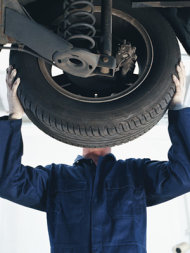
changing a tire

By Teri Cettina

Although you'd rather use your money on more interesting things, you're likely to spend a huge chunk of change maintaining and repairing your car. According to the American Automobile Association (AAA), it now costs nearly $9,000 a year to drive an average-size sedan. And if you own a four-wheel-drive SUV, your annual expenses are more than $11,000. Photo credit: Getty Images
You can't control the roller-coaster costs of gas. And you have only a little wiggle room on insurance fees. But you can save big bucks on car maintenance and repairs. Here's how to keep your car in good running condition-without shelling out too much.
 
1. Maintain and prevent.
The number-one way to pay less on car repairs is to avoid them in the first place. Keep your ride in prime shape by following the manufacturer's recommended maintenance schedule. You'll find it in your car owner's manual (lost yours? find it on Edmunds.com), and service is usually suggested every 15,000 to 30,000 miles. "But don't go by the recommended list of services a dealer or an auto shop hands you; they may suggest extras you don't need," warns Carroll Lachnit, consumer advice editor for Edmunds.com. Also, change your oil as regularly as the manual mandates, which is probably every 7,500 to 10,000 miles, says Lachnit-and not every 3,000 miles as the quickie-lube type shops may advise.

2. Find a reputable shop and be loyal.
Never pick a repair shop out of the phone book or based on an ad. Ask for recommendations from friends, family or coworkers, advises Jim Houser, co-owner of Hawthorne Auto Clinic in Portland, OR. And once you find a good shop, stay with it. "Shops tend to offer regular customers special money-saving coupons and breaks on repair costs because they know you'll return," he says.
 
3. Stick with independent shops.
Unless your car is under warranty and you must go to your dealer for service, head to an independent shop. While these smaller outfits charge close to the same as dealers for parts and labor, you'll save because "they won't sell you unnecessary repairs and services," says Houser. Since dealer service managers often work on commission, it benefits them to sell you as many services as possible-whether or not you need them. 

4. Get a second opinion.
If a dealer pushes a service or repair that your warranty doesn't cover, ask another dealer for their take, suggests Pam Oakes, owner of Pam's Motor City Automotive, in Fort Myers, FL. If you bring your car to an independent repair shop, get a second opinion for any fix over a few hundred dollars. Try another independent shop that specializes in your car's model or a chain like Honest 1 or Meineke if friends or family have recommended them. Even if you have to pay to get the car towed to the second shop, it's worth it, says Oakes. "You could save $1,000 or more if you don't need the suggested repair or learn there's a cheaper workaround," she says. 

5. Do your homework and ask educated questions.
Look online for basic info about your car's problem or suggested repair. You could save money because you may learn which repairs are required and which are just suggested. Then, prepare your questions. "The shop's staff will respect you for being a good researcher and consumer," says Oakes. A reputable shop should be willing to explain in lay language-and even show you-what's going on with your car. If the owner or mechanic is annoyed by your questions or talks over your head, he or she may be trying to intimidate you, sell you unnecessary services or overcharge you. Find a new shop, pronto.

6. Know average charges for repairs.
Websites like RepairPal.com and AutoMD.com offer estimates for common repairs to your make of car in your part of the country. Not sure what's wrong with your ride? You may be able to take a diagnostic quiz to pinpoint the problem. And then you'll get a rough idea of what repairs should cost so you're sure you're getting a fair price. 

7. Pay attention to warnings your car gives you.
They're your vehicle's way of telling you it needs some TLC. Ignoring those signals puts you at risk for doing major, expensive damage. So if your check-engine light comes on, get it evaluated at a reputable shop within a few days. If that light flashes, don't drive at all-get your car towed instead. If your oil light comes on, immediately call for a tow. Hearing an odd sound? Take the car in, suggests Lachnit. If it's a simple fix, you'll get it taken care of before it morphs into a more expensive repair. 

8. Become a DIY-er.
You don't need to be that handy to change your windshield wiper blades, swap out your air filter or put air in your tires, but doing these yourself can save you money. For instance, oil-change shops charge $29 to $60 to replace an air filter, but Lachnit says you can buy one for less than $15 and install it in five minutes. If you're hesitant about making any of these fixes, ask your favorite mechanic for a few pointers after you've developed a good rapport with him or her. 

9. Baby your car.
Have your vehicle thoroughly washed and detailed every few months. It may sound silly, but Oakes says car owners tend to drive more gently and get repairs faster if their ride looks nice. A good-looking car also discourages fellow drivers from casually dinging your door in the parking lot. Likewise, be picky about where you park-even if you have to walk a bit farther to your destination-so you avoid careless drivers and scratchy bushes that may send you to the body shop. 

10. Get a check-up before you travel.
Have your mechanic top off your car's fluids and inspect the tires in advance of a trip. After all, you don't want your car to break down in an unfamiliar place and be towed to a mechanic you don't know if you can trust. According to Oakes, anytime you end up in a shop you haven't researched-or in an emergency situation when you can't compare repair prices-you risk spending more than necessary and getting shoddy service.

Sunday, August 5, 2012

12 Things to Buy Used: You can save a lot by purchasing these items second-hand rather than new

Do you have an aversion to buying second-hand items? Don’t like the idea that someone else used them first? Well, get over it because you can save a lot by buying used rather than new.

Many pre-owned items can cost up to 50% to 75% less than the price you’d pay if you purchased them new. Often you can find "used" goods that have hardly even been used. And with some items, retailers or manufacturers refurbish and repackage them so that they’re practically new again. Here are 12 things that you should consider buying used because you often can find them in good or almost-new condition at a fraction of the price you would pay by buying them new.  

Furniture. If you want to avoid the straight-out-of-the-furniture-showroom look or just don’t have a lot of money to spend outfitting your abode, hit up estate sales, consignment stores, antique stores or even yard sales to find unique and affordable pieces. Craigslist.org is another good source of used furniture. For example, we found a china cabinet, dining table and six chairs for sale on the site for $475. A similar table and chairs was $1,199 at Macys.com and similar china cabinet was $1,499. Word of caution: Don’t buy used mattresses (unless you want to risk getting bed bugs) and consider getting upholstered items professionally cleaned before bringing them into your home.  

Designer jeans. A pair of designer jeans (brands such as True Religion, 7 For All Mankind, Paige, Joe’s Jeans) typically cost $150 to $200. But you can find a gently worn pair at an upscale consignment store for a third of that price. Don’t like the idea that someone else wore them? Well, there’s a good chance at least one – maybe several – people tried on the “new” jeans you bought at the store. (And you probably didn’t think to wash them before wearing them because you assumed they hadn’t been worn.)  

Tablets. The way to get a deal on pricey tablets is to buy refurbished models, which are tested to meet manufacturer specifications. For example, a new iPad2 with Wi-Fi, 3G and 16GB costs $529 new but only $399 refurbished. When buying refurbished, look for tablets with a warranty – one year is ideal, according to dealnews.com.  

Swing sets. High-end, deluxe wooden swing sets can cost as much as several thousand dollars. But even simple models are at least $300, which can be a lot to pay for something your kids will quickly outgrow. That's why it’s smart to buy used swing sets, which you can find for half the original price. Check your local paper’s classifieds or Craigslist.org.  

Books and college textbooks. You can pick up paperbacks at yard sales for $1 (or less) or find them at used bookstores or online at sites such as Amazon.com for a lot less than you’d pay if you bought them new. You also can cut the cost of college textbooks in half by buying used. Use sites such as BigWords.com, CampusBooks.com and AllBookstores.com to scan multiple online retailers to find the lowest-price.  

Kids' bicycles. No need to spend a lot of money on a bike that your child will quickly outgrow. You likely can find a used one with little wear and tear (because the previous owner outgrew it quickly) at a fraction of the cost of a new bike.  

Video games. If your kids (or you) aren’t intent on buying the latest, greatest video games at the time of their release, you can spend half as much buying games used rather than new. Among the retailers that sell pre-owned video games are Amazon.com, Best Buy, GameStop and Walmart.  

Lawn equipment. Mowers, trimmers, pressure washers and other outdoor equipment are good things to buy used because you can easily see what sort of condition they’re in. If the equipment is clean and the parts are barely worn, you know it’s been gently used.  

Power tools. Sometimes people buy tools to complete a project, then never use them again – and unload them at great prices. So no need to pay full price for a tool that you can buy gently used for a lot less. You can find reconditioned tools at Amazon.com, or search Craigslist.org or the classifieds for like-new tools.  

Baby gear. The cost of all the gear parents often buy when having a baby -- such as a crib, bassinet, stroller and high-chair -- can add up quickly. But there’s no need to spend a lot buying these items new when you can find them in mint condition at consignment sales or online auctions for a lot less. Don’t buy used car seats, though, because they might have been involved in an accident, their safety features might have been compromised or they might have been recalled.  

Baby, toddler and kid clothing. Because kids -- especially babies -- grow out of clothing so quickly, it doesn’t make sense to spend a lot on their apparel. You can find name-brand children’s clothing in good condition for just a few bucks per item at upscale consignment stores, which are selective about the items they accept.  

Exercise equipment. Plenty of people have every intention of starting an exercise regimen when they purchase treadmills or elliptical machines, but many times this pricey equipment just gathers dust. That’s why it’s often easy to find used exercise equipment in great condition at great prices -- and you don’t have to feel so guilty if you don’t end up using it as much as you anticipated. For example, we found many name-brand treadmills and elliptical trainers listed for $300 or less on the Washington, D.C., Craigslist.

Monday, June 11, 2012

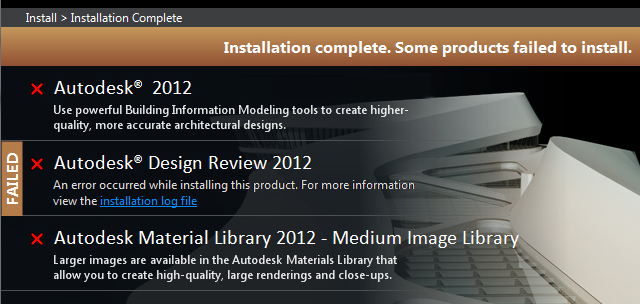
Installation complete. Some products failed to install (Autodesk Revit MEP 2012 installation error)

Issue:  When installing your Autodesk product, the installation fails immediately and the screen indicates that Installation complete. Some products failed to install.

Install_Error.jpg

The link to the installation log file in your %TEMP% location shows that the failure is due to a prerequisite installer similar to this entry below:

Install Microsoft Visual C++ 2010 Redistributable (x86) Failed Installation aborted, Result=1603

Subseqent attempts to install the product yield similar failures.

Solution #1:  In some rare instances, the prerequisite cannot installed until the workstation is rebooted, or cannot be installed by the Autodesk installer and must be installed manually from the media or by downloading the prerequisite directly from Microsoft's website.  For more information about this solution, please visit this Autodesk KB link:

http://usa.autodesk.com/adsk/servlet/ps/dl/item?siteID=123112&id=15924324&linkID=9240857

Solution #2:  In most instances, the installation fails because the prerequisite already installed on the workstation is newer than the one supplied by the Autodesk installer.  Because Windows will not allow an older version of the prerequisite to be installed, the installation aborts with a 1603 error in the installation log file.

The most direct method to resolve this issue is to remove the installed prerequisite from Windows from within the Control Panel.  You can launch the Control Panel directly from the Start Menu or from the Run box by typing CONTROL and clicking OK.

To remove a program in Control Panel choose:

Windows XP: Add/Remove Programs

Windows 7:  Programs and Features

Locate the program name of the prerequisite that is failing in your log file from within this list and click Remove or Uninstall.  This will remove the program from your computer.

ControlPanel.png

Once the program has been removed, run your Autodesk installer again.  If you run into additional failures on prerequisites, repeat the process.  You should now be able to fully install and run your product.

For more information about this error, please see the Up and Ready blog link here:

http://upandready.typepad.com/up_and_ready/2011/09/autodesk-suites-product-design-suite-will-not-ins...

Note:  When installing Autodesk products, it is recommended that you have local Administrative rights, User Access Control (UAC) is off, and your real-time anti-virus program is temporarily disabled. In some instances it may be helpful to login as another user with local admin rights and/or copy the contents of the media to you hard drive and install locally.